Setting Up HECS/HELP in Your Payroll Software: Step‑by‑Step for Australian Small Businesses
Setting up HECS/HELP in your payroll software requires you to record an employee’s study loan declaration correctly so the appropriate amount is withheld when required under the current ATO tax tables. HECS/HELP is part of the Australian tax system and applies to eligible students who use a government loan to pay their student contribution amount. Employers do not manage the employee’s loan balance, but they must apply the correct withholding settings when an employee declares a Higher Education Loan Program (HELP) debt.
HECS and Its Impact on Payroll
The Higher Education Contribution Scheme, commonly called HECS, helps eligible students pay tuition fees for higher education. The current HECS-HELP program allows an eligible student enrolled in a Commonwealth Supported Place (CSP) to defer their student contribution through a loan provided by the Australian Government. In a CSP, the government pays part of the cost of the course directly to the education provider. The student pays the remaining student contribution amount, either through an upfront payment or by using a HECS-HELP loan.
A HECS-HELP debt becomes part of the student’s accumulated HELP debt. For the 2026–27 income year, a compulsory repayment applies when repayment income is more than $69,528, with the Australian Taxation Office (ATO) calculating the amount under the marginal repayment system when the employee’s tax return is assessed.
Employer Responsibilities for HECS Withholding
An employer does not calculate how much HECS an employee owes or make payments directly to the employee’s HELP balance. Instead, the employer uses the Pay as You Go (PAYG) withholding system to withhold a study and training support loans component when the employee has declared a relevant loan and the current ATO tax table requires an amount to be withheld. The employee’s compulsory repayment is calculated by the ATO when their tax return is assessed. Their total repayment income can include taxable income, reportable fringe benefits, reportable superannuation contributions, total net investment losses and exempt foreign employment income. The final compulsory repayment may therefore differ from the amount withheld through payroll, particularly when the employee receives income from other sources.
Voluntary repayments are separate from payroll withholding. Employees can make voluntary repayments directly to the ATO, but these payments do not replace a compulsory repayment that may arise from their annual income.
Step 1: Collect the Employee’s Tax Details
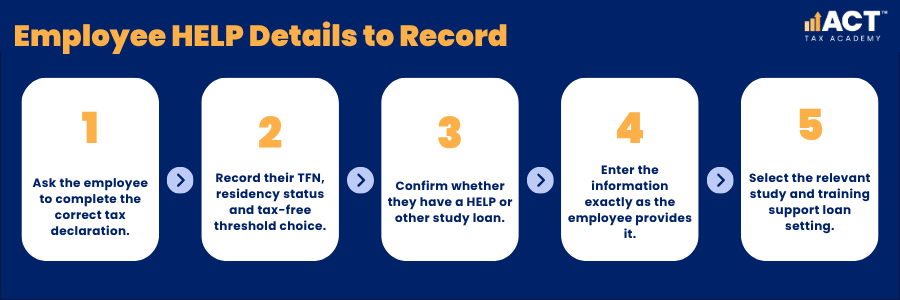
For a new employee, ask them to complete a Tax file number declaration. An existing employee who needs to add or change their study or training support loan details should complete a Withholding declaration. These forms record their Tax File Number (TFN), residency status for tax purposes, tax-free threshold selection and relevant loan obligations. An employee may provide these details through ATO online services, an employer’s approved electronic onboarding process or the relevant paper declaration. You should enter the information exactly as provided rather than making assumptions about the employee’s HELP debt, citizenship or residency requirements.
An employee may have a debt from HECS-HELP, FEE-HELP, VET Student Loans or another government loan program. For payroll purposes, your software may group these obligations under a general study and training support loan setting.
Step 2: Review the Employee’s Eligibility Declaration
HECS-HELP eligibility requirements apply when the student first accesses the loan, not when you process their payroll. Eligible students may include an Australian citizen, an eligible permanent humanitarian visa holder or certain New Zealand Special Category Visa holders who meet the applicable residency requirements. The student generally confirms their eligibility through an electronic Commonwealth Assistance Form before the census date for their course. This may also be called a HECS-HELP loan form or Commonwealth Assistance Form.
As an employer, you do not need to assess whether the employee was academically suitable, met the citizenship and residency requirements or remained in Australia for the duration of their course. Those matters form part of the application process between the student, the education provider and the Australian Government.
Step 3: Open the Employee’s Payroll Tax Settings
Open the employee’s record in your payroll software and locate the tax or withholding section. The wording varies between platforms, but you will usually see fields for the TFN, tax-free threshold, residency status and study loan obligations. Check that each field matches the employee’s declaration. A HELP setting does not operate by itself because the withholding calculation also depends on factors such as the employee’s taxable pay, tax-free threshold choice and pay frequency.
The employee’s annual income is not entered as a fixed estimate. Payroll software calculates withholding from each pay, while the ATO determines the final compulsory repayment after the employee lodges their tax return.

Step 4: Activate the HELP Debt Setting
Select the option showing that the employee has a study or training support loan. Depending on the payroll software, this setting may cover a Higher Education Loan Program (HELP), VET Student Loan (VSL), Financial Supplement (FS), Student Start-up Loan (SSL) or Australian Apprenticeship Support Loan (AASL) debt. Do not enter the employee’s accumulated HELP debt, HECS loan balance or HELP loan limit into the payroll system. The outstanding balance remains between the employee and the ATO, and it does not determine the withholding amount taken from an individual pay.
Save the employee record and check the effective date. For a new employee, the setting will generally apply from their first pay. For an existing employee, apply the updated details after receiving the appropriate declaration.
Step 5: Confirm That Current Tax Tables Are Installed
Your payroll software must use the current ATO withholding tables. The minimum repayment threshold and withholding calculations can change between financial years, so outdated software may calculate the wrong amount even when the employee’s settings are correct. Most cloud payroll systems update tax tables automatically, but you should still check update notices before processing the first payroll of a new financial year. Businesses using desktop software may need to download and install an update manually.
Step 6: Review a Draft Pay Run
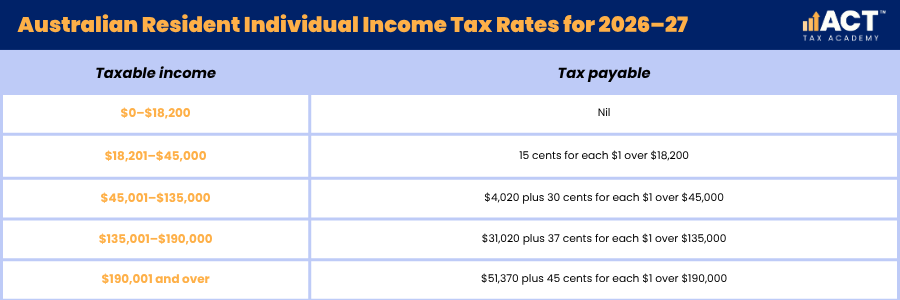
Prepare the employee’s pay and review the calculation before finalising it. Check their gross taxable earnings, PAYG withholding, study loan setting and total tax withheld. For payments made from 1 July 2026, the weekly table generally applies from weekly earnings of $1,337 when the employee claims the tax-free threshold, or $987 when they do not claim it. Different thresholds apply to other pay frequencies, and the employer must use the current ATO table that matches the employee’s circumstances.
The study and training support loans component applies to earnings including taxable allowances, bonuses and commissions. It must not be withheld from lump sum termination payments, so each payroll item must be classified correctly before the pay run is finalised.
Step 7: Report the Pay Through Single Touch Payroll
After checking the calculation, finalise the pay and report it through Single Touch Payroll (STP). STP provides the ATO with year-to-date information about the employee’s salary or wages, tax withheld and superannuation. Confirm that the STP submission has been accepted. A rejected report may mean the employee’s year-to-date payroll information has not been updated correctly. You do not report a separate payment against the employee’s HELP balance. The additional amount remains part of PAYG withholding and is reconciled through the employee’s tax return.
Updating an Employee’s HECS/HELP Setting
Change the payroll setting after the employee provides a completed Withholding declaration advising that their study or training support loan circumstances have changed. When the HELP debt or other relevant loan has been repaid in full, the employee should complete a new Withholding declaration so you can stop withholding the additional component. Employees can review their HELP debt and find further information through ATO online services. They remain responsible for telling you when their withholding details change. If an error is found, review the declaration, payroll settings and affected pay runs before processing a correction. This helps you avoid changing the wrong field or creating a second error.

Build Practical Bookkeeping Skills
Setting up HECS/HELP correctly supports accurate payroll records and reduces the risk of unexpected tax outcomes for employees. By recording declarations carefully, using current tax tables and reviewing each pay run, you can manage study loan withholding as part of a reliable payroll process. If you are ready to move from theory to practical application, the ACT Tax Academy Bookkeeping Online Course provides structured online training designed specifically for Australian small business owners and aspiring bookkeepers. You will learn how to set up and manage GST, prepare BAS, use Xero effectively, and implement compliant bookkeeping systems with confidence.