Setting Up Payroll Categories for Reportable Fringe Benefits in Xero and QuickBooks
Setting up payroll categories for reportable fringe benefits in Xero and QuickBooks helps Australian employers report fringe benefits correctly without treating them as ordinary salary. This matters because a reportable fringe benefits amount can appear on an employee’s income statement and affect income tests, even though it is not the same as cash salary. For many small businesses, the difficulty is knowing what belongs in payroll and what belongs in Fringe Benefits Tax (FBT) records. A clear setup helps your employer reports stay accurate, supports Single Touch Payroll reporting, and reduces the risk of year-end corrections.
Understanding Reportable Fringe Benefits Before Payroll Setup
Understanding reportable fringe benefits starts with knowing that fringe benefits are non-cash benefits provided to an employee or their associate because of their employment. Certain fringe benefits must be reported when the total taxable value of reportable fringe benefits provided to an employee exceeds $2,000 for the FBT year. The FBT year runs from 1 April to 31 March, while payroll finalisation is completed for the financial year ending 30 June. This timing difference is one reason employers should prepare reportable benefits records before opening Xero or QuickBooks.
How Fringe Benefits Tax FBT Differs from Income Tax
Fringe Benefits Tax (FBT) is paid by the employer, not the employee. It applies to certain benefits provided to an employee, such as private use of a work car, car parking, meal entertainment, expense payments, or salary packaging arrangements. The employee does not include the reportable fringe benefits amount as assessable income in their tax return. However, the RFBA can still affect adjusted taxable income, repayment income, and various income tests used by government agencies.
Why the Reportable Fringe Benefits Amount Matters
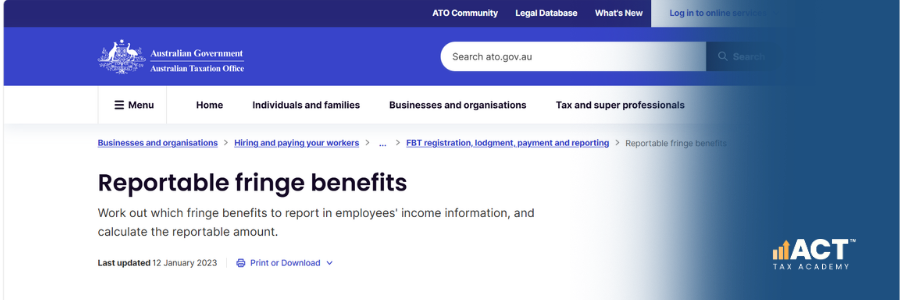
The Reportable Fringe Benefits Amount (RFBA) is the grossed-up amount reported for an employee when the total taxable value of certain fringe benefits exceeds $2,000 for the FBT year. It reflects the taxable value of certain fringe benefits grossed up using the lower Type 2 gross-up rate, not an extra payment made through payroll. An RFBA can affect the Medicare levy surcharge, Higher Education Loan Program repayments, family assistance, Family Tax Benefit, and other government benefits. This is why the reportable amount must be accurate before it appears on the employee’s income statement.
Preparing FBT Records Before Using Xero or QuickBooks
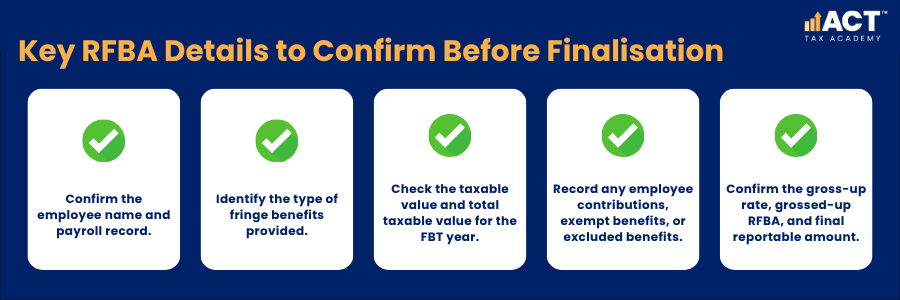
Good payroll setup begins with your FBT records, not your pay categories. Before entering anything into Xero or QuickBooks, confirm which employees receive fringe benefits and whether the employee exceeds the reportable threshold. You should also confirm the taxable value, total taxable value, employee contributions, exempt benefits, and any minor benefits that do not need to be included. This gives your accountant, bookkeeper, or tax agent a clear basis for reviewing the final reportable fringe benefits amount.
Information to Collect for Each Employee
Your records should show the benefits provided, the period they relate to, and how the taxable value was calculated. If salary packaging is involved, keep the salary packaging provider’s reports with your payroll and FBT working papers.
Benefits That Need Extra Care
Certain benefits can be easy to confuse with ordinary pay. For example, a car allowance paid in cash is processed through payroll, while private use of a work vehicle may be a fringe benefit. Meal entertainment, car parking, expense payments, and salary packaging can also require careful review. Where the rules are unclear, ask a registered tax agent before reporting the amount through payroll.
Setting Up Reportable Fringe Benefits in Xero
In Xero, payroll categories and pay items should be mapped correctly so wages, allowances, deductions, reimbursements, and salary sacrifice amounts report in the right place. Reportable fringe benefits should not be added as ordinary taxable pay unless your adviser has confirmed that treatment. For most employers, RFBA is entered or reviewed during Single Touch Payroll finalisation rather than paid through a normal pay run. This helps keep taxable income, PAYG withholding, superannuation, and fringe benefits reporting separate.
Review Pay Items Before Finalisation
Start by checking that ordinary salary, allowances, deductions, and salary packaging items are set up correctly. This matters because reportable fringe benefits can sit beside payroll information on an income statement, but they are not the same as wages. Look closely at any pay item linked to vehicles, reimbursements, meals, entertainment, or employee benefits. If an item represents cash paid to an employee, it may need payroll treatment; if it represents fringe benefits provided, it may need FBT and RFBA reporting instead.
Enter RFBA in the Finalisation Process
Once your FBT calculation is complete, use the STP finalisation process in Xero to enter the reportable fringe benefits amount for each relevant employee. The amount should be the grossed up RFBA, not the original taxable value of the benefit.
A simple Xero workflow is:
- Finish all pay runs for the income year.
- Reconcile payroll reports to accounting records.
- Confirm FBT records for the FBT year, which runs from 1 April to 31 March.
- Calculate the RFBA for each relevant employee by applying the lower Type 2 gross-up rate to the total taxable value of reportable fringe benefits.
- Enter the RFBA during STP finalisation.
- Review the employee’s income statement details.
- Lodge only after the employer and adviser have checked the figures.
Setting Up Reportable Fringe Benefits in QuickBooks
In QuickBooks Payroll, the same principle applies, keep ordinary pay categories separate from reportable fringe benefits. Your payroll setup should allow the employer to report fringe benefits correctly without overstating cash salary or taxable income. QuickBooks users should review payroll settings, pay categories, deductions, salary packaging items, and STP settings before finalisation. This is especially important if custom pay categories have been created during the year.
Review ATO and Payroll Settings
Check the employer settings before preparing the finalisation event. If your organisation has exempt fringe benefits or special FBT treatment, the settings may affect how reportable benefits are shown. This step is important for employers connected with charities, health organisations, public sector bodies, or other entities that may have exempt benefits. If you are unsure whether an amount is exempt, reportable, or excluded, confirm the treatment before lodging.
Check Pay Categories and Deductions
Review pay categories that relate to vehicles, living expenses, meals, entertainment, allowances, reimbursements, and salary packaging. The goal is to confirm that cash payments are reported as pay, while RFBA is reported as a fringe benefits amount. For example, if an employee receives a cash allowance, that may be payroll income. If the employee receives fringe benefits provided through salary packaging, the reportable fringe benefits amount may need to be reported separately at year end.
Enter RFBA During Finalisation
When your payroll file is ready, create the STP finalisation event and review each employee’s year-to-date details. Enter the correct RFBA for any employee whose total taxable value of reportable fringe benefits exceeds $2,000 for the FBT year.
A practical QuickBooks workflow is:
- Finalise all pay runs.
- Reconcile payroll to the general ledger.
- Review pay categories and deductions.
- Confirm FBT records for the FBT year.
- Calculate the reportable fringe benefits amount RFBA.
- Enter or review RFBA in the finalisation process.
- Lodge the finalisation event.
- Prepare an amendment if a correction is needed.
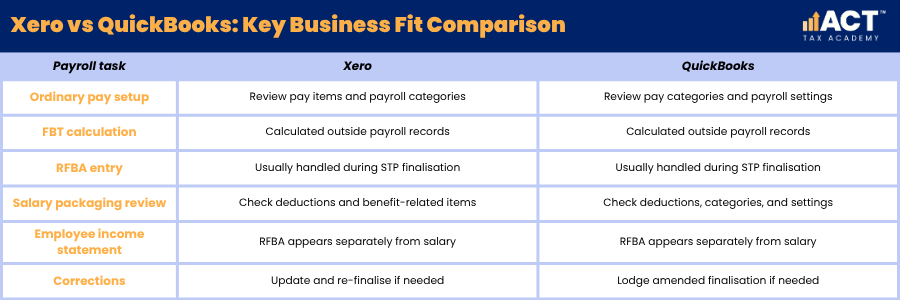
Xero and QuickBooks Compared for RFBA Reporting
Xero and QuickBooks use different screens, but the payroll logic is similar. Reportable fringe benefits should be reported in the correct STP area, not mixed into ordinary taxable wages. This comparison helps employers and bookkeepers check the right part of the workflow.
How RFBA Can Affect Employees
An RFBA does not form part of an employee’s assessable income and the employee is not taxed on the RFBA itself. This is why employees may notice reportable fringe benefits on their income statement even though they did not receive extra cash salary. An RFBA can affect calculations used by Services Australia, the ATO, and other government agencies. These calculations can influence repayment income, income tests, means tests, and access to some government benefits.
Income Tests and Government Benefits
Reportable fringe benefits may be included when working out adjusted taxable income or related income-test amounts, depending on the specific test. This can affect family assistance, Family Tax Benefit, Medicare levy surcharge, and other government benefits. Employees may also see an effect on Higher Education Loan Program repayments because repayment income can include taxable income plus other amounts, including reportable fringe benefits. For this reason, employers should explain that RFBA is reported information, not extra wages.
Payment Summary and Income Statement Wording
Under STP, employees generally access their income statement through myGov instead of receiving a payment summary, although payment summary terminology may still be relevant in limited non-STP or historical contexts. Some employers and employees may still use older terms such as PAYG payment summary, PAYG summary, or employee’s payment summary when discussing year-end records. The key point is that RFBA should appear separately from salary and wages. This helps employees and their tax agents understand what has been paid as income and what has been reported as fringe benefits.
Build Practical Bookkeeping Skills
Setting up payroll categories for reportable fringe benefits in Xero and QuickBooks is about keeping payroll, FBT, and STP reporting in the right lanes. When you separate salary from fringe benefits, calculate the grossed up value of reportable benefits provided, and review how the RFBA may affect adjusted income before lodgment, you reduce stress and support cleaner reporting for both the employer and employee.
If you are ready to move from theory to practical application, the ACT Tax Academy Bookkeeping Online Course provides structured online training designed specifically for Australian small business owners and aspiring bookkeepers. You will learn how to set up and manage GST, prepare BAS, use Xero effectively, and implement compliant bookkeeping systems with confidence.