Creating a Digital Audit Trail for the Small Business Retirement Exemption: Using Cloud Storage and Practice Management Tools
Creating a digital audit trail for the small business retirement exemption helps small business owners prove how a Capital Gains Tax (CGT) decision was made, supported, approved, and recorded. This matters because a missing written record, unclear calculation, or poorly stored document can make an otherwise eligible exemption harder to explain later.
Why a Digital Audit Trail Matters for the Retirement Exemption
A digital audit trail gives you one organised source of truth for the retirement exemption. It connects the CGT event, the asset sold, the capital proceeds, the cost base, and the exempt amount in a way that can be reviewed without searching through scattered emails or paper files.
This is especially useful when a company, trust, or other structure is involved. Where there are CGT concession stakeholders, interposed entities, or connected entities, your records should explain who received payments, how the exemption was applied, and whether any required amount was paid to a complying superannuation fund or retirement savings account.
Start with Evidence That the Business Asset Qualifies
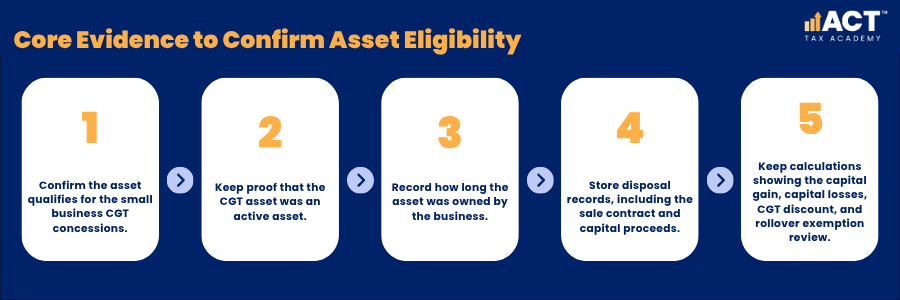
Your file should first show that the basic conditions for the small business CGT concessions were satisfied, including the active asset test where required. This may include proof that the CGT asset was an active asset, how long the asset was owned, and how it was used in the small business. You should also keep evidence of the disposal, including the sale contract, capital proceeds, and selling costs. These records help calculate the capital gain and show whether capital losses, the CGT discount, the rollover exemption, or other concessions were considered before claiming the business retirement exemption.
What the Evidence Should Show
The records should explain when the asset was acquired, when the asset was sold, and how the proceeds were calculated. They should also show the asset owned by the business or relevant entity, the cost base, and the circumstances that make the asset eligible. If capital losses were applied before the exemption, keep the calculation with the CGT workpapers. If the business considered a replacement asset or the small business roll-over but chose the retirement exemption instead, record the reason so the decision is clear later.
Use Cloud Storage to Keep Documents Clear and Searchable
Cloud storage works best when every file has a clear name, date, and purpose. A folder named “small business retirement” may help, but a structured folder for each asset, disposal, calculation, and contribution makes the file easier to review. Use simple file names that explain what the document contains.
Practice Management Tools Help Track Each Decision
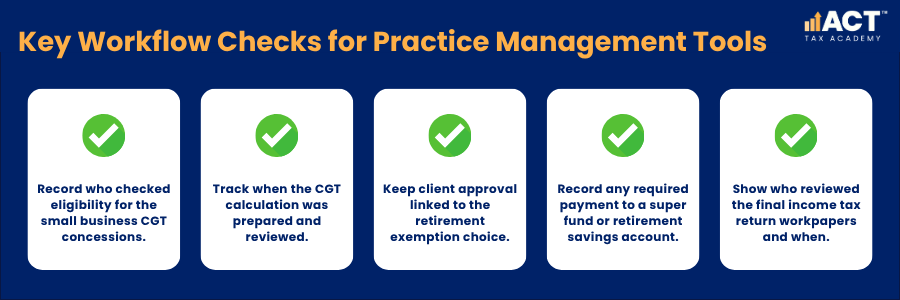
Practice management tools help your team record who completed each step and when. This gives the retirement exemption file a clear workflow, rather than leaving important decisions hidden in emails or memory. The tool should track eligibility checks, calculation reviews, client approvals, and any required payment or contribution deadlines under the retirement exemption rules. It should also record whether the full amount or only part of the gain was claimed as exempt.
How the Workflow Should Read
The workflow should begin with an eligibility review for the small business CGT concessions and active asset status. It should then move through the CGT calculation, including the capital proceeds, cost base, any capital losses, and the final exempt amount. After that, the file should show the written record, client approval, and any required payment to a complying superannuation fund or retirement savings account. When the income tax return workpapers are completed, the practice management tool should show who reviewed the final claim and when.
Keep a Clear Written Record of the Exemption Choice
The retirement exemption should be supported by a written record that explains the amount being disregarded. This record should show the exempt amount, the relevant person, and how the amount fits within the lifetime limit.
If the person was under 55 years old just before choosing the retirement exemption, the file should show whether an amount equal to the exempt amount was paid into a complying superannuation fund or retirement savings account. Where a company or trust makes payments under the retirement exemption, the record should show each CGT concession stakeholder’s percentage of the exempt amount, how each payment was calculated, and whether any required payment was made to a complying superannuation fund or retirement savings account.
Example: Selling an Active Business Asset
A small business owner sells an active asset and makes a capital gain. Their accountant calculates the capital proceeds, deducts the cost base, considers any capital losses, and then reviews whether the small business retirement exemption can apply.
The cloud folder includes the sale contract, calculation workpaper, written record, and any complying superannuation fund or retirement savings account receipt required for the exemption. The practice management tool also records client approval, adviser review, and the date the contribution was made.
Build Practical Bookkeeping Skills
A clear digital audit trail helps small business owners and advisers manage the small business retirement exemption with less stress and more confidence. By keeping cloud records, written approvals, CGT calculations, and super contribution evidence together, you make the exemption easier to review, explain, and support.
If you are ready to move from theory to practical application, the ACT Tax Academy Bookkeeping Online Course provides structured online training designed specifically for Australian small business owners and aspiring bookkeepers. You will learn how to set up and manage GST, prepare BAS, use Xero effectively, and implement compliant bookkeeping systems with confidence.