Designing a Monthly Accounting Calendar for Australian Small Businesses: BAS, Super, Payroll and ATO Deadlines
Designing a Monthly Accounting Calendar for Australian Small Businesses: BAS, Super, Payroll and ATO Deadlines helps small business owners manage tax obligations, payroll, super and record keeping in one clear routine. Many small businesses fall behind because key dates are spread across accounting software, emails, bank statements and Australian Taxation Office (ATO) reminders. A monthly calendar brings small business accounting into a practical workflow instead of leaving everything until tax time. It supports cash flow, keeps financial records organised and helps Australian businesses make informed decisions before deadlines become stressful.
Why a Monthly Accounting Calendar Supports Better Business Accounting
A monthly accounting calendar helps business owners stay compliant by turning accounting, bookkeeping and tax reporting into repeatable habits. It gives you a clear view of what needs to be reviewed, lodged, paid and followed up each month. This matters because most businesses have more than one financial task happening at the same time. You may need to send invoices, track expenses, reconcile a bank account, prepare pay runs, review Goods and Services Tax (GST), and check super contributions within the same monthly cycle.
Keeping Business Finances Separate and Organised
A strong calendar starts with clean separation between personal and business finances. Mixing personal spending with business expenses makes it harder to track expenses, review financial accounts and prepare accurate tax returns. Small business owners should use a dedicated business bank account and avoid using it for private purchases. This makes bank statements easier to reconcile and gives your accountant or bookkeeper clearer financial records to review.
Improving Cash Flow Before Deadlines Arrive
Cash flow is easier to manage when BAS, payroll and super payments are visible before they are due. Your calendar should show both the final due date and the internal date when money needs to be set aside. This helps you plan for GST, Pay As You Go (PAYG) withholding and super without disrupting daily business operations. It also gives you a better view of how much money is available for expenses, suppliers, growth plans and unexpected costs.
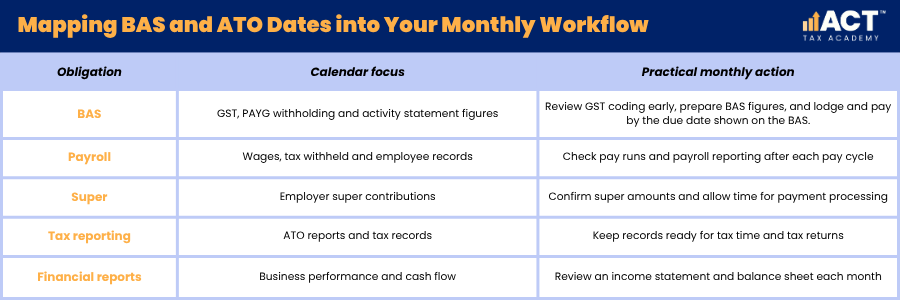
Mapping BAS and ATO Dates into Your Monthly Workflow
Your calendar should start with the main ATO dates, then work backwards to create preparation tasks. This prevents your Business Activity Statement (BAS) deadline from becoming the first time you check GST, invoices and expense records.
For monthly BAS lodgers, the regular rhythm is preparation early in the following month, review before lodgment, and lodgment and payment by the 21st day of the month following the end of the taxable period, unless the ATO shows a different due date on the BAS. Quarterly BAS lodgers can still use the same monthly habit so the quarter-end workload is smaller. The ATO due date shown on the BAS should always be checked, as quarterly due dates can vary depending on the quarter, online lodgment and whether a registered BAS or tax agent lodges for the business.
Reviewing GST Before BAS Preparation
GST should be checked before BAS figures are finalised. This means reviewing sales, expenses, online payments, supplier bills and financial transactions to make sure they have been recorded correctly. Common problems include missing tax invoices, incorrect GST codes and business expenses paid from personal accounts. A monthly review helps you correct these issues before BAS lodgment.
Planning for PAYG Withholding and Instalments
PAYG withholding is the tax you withhold from employee wages and report to the ATO. PAYG instalments are separate payments towards your business or personal income tax, depending on your structure. Your calendar should list these items clearly so they are not confused. Sole traders, companies and larger businesses may have different reporting patterns, so professional advice is useful when setting up your calendar.
Building Payroll Checks Into Every Month
Payroll should be reviewed each pay cycle, not only when BAS is due. Wages, PAYG withholding, leave, super and Single Touch Payroll (STP) all affect your financial records and tax reporting. STP is the system used to report payroll information to the ATO, generally on or before the payday when employees are paid. A calendar helps you check payroll before payment, confirm reports after payment and fix errors before they affect employees or financial statements.
Before Each Pay Run
Before each pay run, confirm hours worked, leave taken, allowances, new employees and employee bank details. This reduces the risk of underpaying staff, overpaying wages or reporting incorrect payroll figures. This step is especially important for businesses in many industries where rosters, casual hours and overtime change often. A clear checklist helps save time and reduces repetitive tasks.
After Each Pay Run
After each pay run, confirm that wages were paid, STP reporting was lodged successfully, and PAYG withholding was recorded correctly. If errors appear in the STP report, correct them promptly through your payroll software or ATO online services. You should also check that payroll journals have updated your accounting software correctly. These checks help keep your income statement, balance sheet and payroll reports accurate. They also give your accountant better information when reviewing business performance or preparing tax returns.
Adding Super Deadlines Without Leaving Them Too Late
Super needs a clear place in your monthly calendar because payment timing matters. For employee earnings paid up to 30 June 2026, super guarantee contributions must reach the employee’s super fund by the quarterly due date, so it is not enough to start the payment on the final day. Your calendar should include a super review date, a payment processing date and a final due date. For earnings paid from 1 July 2026, update this process for Payday Super so super is planned with each pay cycle rather than treated only as a quarterly task. This gives you time to correct employee fund details, rejected payments or clearing house issues.
Building a Buffer Around Super Payments
A safer calendar does not wait until the final day to pay super. Payment processing can take time, and delays may create compliance issues. For practical record keeping, note when super was calculated, approved and paid. This gives you a clear audit trail and makes it easier to respond if a staff member or adviser asks about a contribution.
Preparing Payroll Systems for Changing Super Rules
Small businesses should review their payroll and bookkeeping software before 1 July 2026, when Payday Super begins for employee earnings paid from that date. The aim is to make sure payroll; super and cash flow processes work together. This may involve checking employee details, super fund information, automated reminders, clearing house settings, payroll reports and cash flow planning. Getting professional advice can help you understand what applies to your business needs.

Choosing Accounting Software That Supports the Calendar
Accounting software should make your monthly calendar easier to follow, not more complicated. The right system helps you record financial transactions, send invoices, manage expenses and review business finances in one place. Many small businesses use cloud based accounting software because it allows business owners, bookkeepers and accountants to access current information. Small business accounting software can also reduce manual work through automated bank feeds, recurring invoices and financial reports.
Using Automated Bank Feeds and Bank Statements
Automated bank feeds bring bank account transactions into your accounting software. This makes it easier to match payments, reconcile bank statements and identify missing invoices. Automated bank feeds do not replace good judgement. You still need to check that transactions are coded correctly and that personal spending has not been mixed with business expenses.
Matching Software Packages to Business Needs
The best bookkeeping software depends on your business needs, size and workflow. Some software packages suit sole traders who need simple invoices and expense management, while others support inventory management, payroll, online payments and larger businesses. Popular options may include Xero, MYOB and QuickBooks Online, but the right choice depends on how your business operates. Look for features that help you manage invoices, customers, payroll, tax reporting and financial reports without creating unnecessary complexity.
Avoiding Software Features You Do Not Need
Some platforms promote unlimited invoices, recurring invoices and advanced reporting tools. These features can be useful, but they should match your business operations. A small service business may only need basic invoicing, expense tracking and bank reconciliation. A growing retail business may need inventory management, online payments, payroll and more detailed financial reports.
Reviewing Financial Reports Before Making Business Decisions
A monthly accounting calendar should include time to review financial statements, not just lodge forms. BAS and payroll keep you compliant, but financial reports help you understand financial health. The two reports most small business owners should review regularly are the income statement and balance sheet. Together, they show revenue, expenses, profit, assets, liabilities and whether the business continues to remain financially stable.
Using the Income Statement to Track Performance
An income statement shows revenue, expenses and profit over a period. Reviewing it monthly helps you see whether sales are growing, costs are increasing or margins are changing. This report supports better business decisions because it shows what is happening before tax time. For example, rising expenses may show that supplier costs need review or pricing needs adjustment.
Using the Balance Sheet to Check Financial Health
A balance sheet shows what the business owns and owes at a point in time. It includes bank balances, customer amounts owed, supplier bills, loans, GST liabilities and other financial accounts. Small business owners can use the balance sheet to check whether cash flow pressure is building. It also helps your accountant identify issues before preparing tax returns or giving professional advice.
Designing a Practical Monthly Accounting Calendar
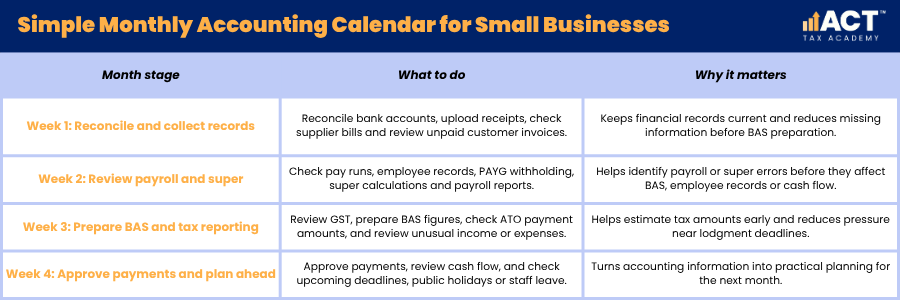
A useful accounting calendar should divide the month into clear stages. This gives your team a steady routine and helps you manage accounting tasks before they become urgent. The calendar does not need to be complex. It can be built in accounting software, a shared spreadsheet, a digital calendar or a simple monthly checklist.
Week 1: Reconcile and Collect Records
Use the first week to reconcile bank accounts, upload receipts, check supplier bills and review unpaid customer invoices. This keeps financial records current and reduces missing information later. For example, a Canberra trades business might use the first Friday of each month to check fuel receipts, materials invoices and customer payments. This simple habit makes BAS preparation easier.
Week 2: Review Payroll and Super
Use the second week to review pay runs, employee records, PAYG withholding and super calculations. This gives you time to correct payroll issues before they affect BAS or employee records. This is also a good time to check whether payroll reports match the amounts shown in your accounting software. If something looks unusual, investigate it before the month continues.
Week 3: Prepare BAS and Tax Reporting
Use the third week to review GST, prepare BAS figures and check ATO payment amounts. If you lodge quarterly, keep the same monthly habit so the quarter-end review is faster. This step should include checking income, expenses, online payments and any unusual financial transactions. It also helps you estimate how much money should be kept aside for tax.
Week 4: Approve Payments and Plan Ahead
Use the final week to approve payments, review cash flow and plan for the next month. This turns accounting information into practical planning. You can also check whether upcoming deadlines fall near public holidays, staff leave or busy trading periods. This small step helps the business stay organised when schedules change.
Common Calendar Mistakes That Create Accounting Stress
The most common mistake is recording only the final due date. A deadline is useful, but it does not show when records need to be reviewed, who is responsible or what report should be checked. Another mistake is relying on accounting software without reviewing the information inside it. Software can speed up bookkeeping, but business owners still need to understand the numbers and ask questions when something looks wrong.
Mixing Personal and Business Spending
Mixing personal and business spending makes bookkeeping harder and can create problems at tax time. It also makes financial reports less reliable because expenses may not reflect the true cost of business operations. Use a separate business bank account and record personal drawings or owner payments clearly. This supports cleaner record keeping and easier tax reporting.
Leaving Invoices and Expenses Too Late
Late invoicing affects cash flow because customers cannot pay invoices they have not received. Delayed expense recording also makes BAS and financial reports less accurate. Your calendar should include regular time to send invoices, follow up customers and record expenses. This simple routine can improve cash flow and reduce end-of-month pressure.
Not Asking for Professional Advice Early
Some business owners wait until a problem appears before speaking to an accountant. Earlier advice is often more useful because it helps you set up systems correctly before errors repeat. Professional advice can help you choose accounting services, review software settings and understand tax obligations. It also gives you confidence that your calendar matches your business structure and reporting requirements.

Build Practical Bookkeeping Skills
A monthly accounting calendar helps small businesses bring BAS, super, payroll, invoices, expenses, tax and financial reports into one organised routine. When your calendar supports good record keeping, reliable accounting software, clear payroll reporting and regular cash flow reviews, you can stay compliant and make better business decisions.
If you are ready to move from theory to practical application, the ACT Tax Academy Bookkeeping Online Course provides structured online training designed specifically for Australian small business owners and aspiring bookkeepers. You will learn how to set up and manage GST, prepare BAS, use Xero effectively, and implement compliant bookkeeping systems with confidence.