
How to Calculate Hourly Pay Rates Correctly for Award and Non-Award Employees
How to calculate hourly pay rates correctly for award and non-award employees stays just as important when you also factor in tax, super and take-home pay. You still start with the right hourly wage, but business owners also need to think about how that flows through to gross income, taxable income and the net pay employees actually see in their bank account. When these pay calculations are clear, you can explain payslips with confidence and keep everyone on the same page.
Why Hourly Pay Rates Affect Tax and Take-Home Pay
We keep the same practical structure but now link hourly rate decisions to simple income tax outcomes. We refer to pay calculator tools, hourly rate calculator options and net pay calculator checks in a way that is easy to follow. You can use this article as a bridge between understanding award rules and using a payroll calculator to work out take-home pay for each pay cycle.
From an employee’s point of view, the difference between gross salary and take-home pay can feel confusing. They hear about annual salary, monthly salary, fortnightly pay and per week amounts, and then see tax withheld, Medicare levy and superannuation guarantee on the payslip. When you can show how an hourly calculator or salary calculator turns an hourly rate into total annual income and home pay, those conversations become much easier.
What Is the Difference Between Award and Non-Award Employees?
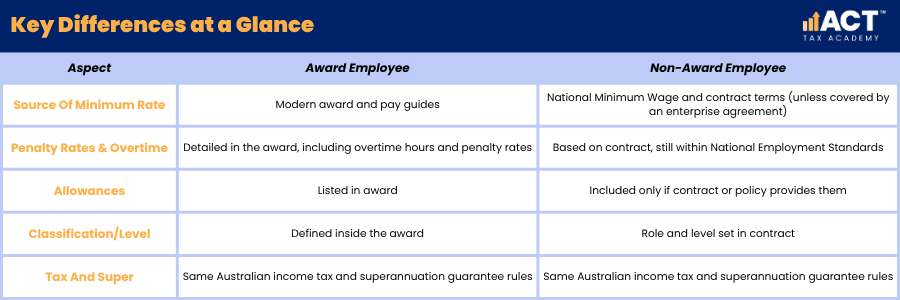
Award employees still have their minimum base salary and penalty rates set by a modern award, and the same tax rates apply to their gross salary as any other worker. The award does not change their tax bracket or tax rate, but it does affect their ordinary time earnings, overtime hours and the way you estimate pay per pay period. Award- and agreement-free employees usually rely on their employment contract, the National Employment Standards, and the National Minimum Wage. Some other employees may instead be covered by an enterprise agreement rather than a modern award.
When you are planning salary expectations for a role, think about whether it is better to talk in terms of hourly wage, per hour, or annual salary. For many hourly workers, using a pay calculator hourly rate tool or simple hourly rate calculator helps them understand how hours per week and penalty rates will add up over a typical pay period. For salaried staff, a salary converter or salary calculator can translate base salary into an approximate hourly rate, which can be useful when comparing offers and market value.
How Do You Find the Correct Modern Award and Classification?
Finding the correct award and classification remains the first step before you use any payroll calculator or pay calculator. Once you lock in the right level and hourly rate, you can then use an hourly calculator or contractor pay calculator to estimate pay for different roster patterns. This is especially useful when staff regularly work overtime hours, weekends or evenings and want to know how that affects their gross income.
When you have the classification sorted, update your employment contracts so that base salary, hours per week and expected penalty rates are all clearly described. This makes it easier later when you discuss a pay rise, adjust salary packaging or use a salary sacrifice calculator to avoid Super Guarantee Charge obligations. Clear contracts also give you a strong base when you enter figures into any pay calculator or contractor pay tool to work out expected total annual income.
How Do You Calculate Hourly Pay for Award Employees?
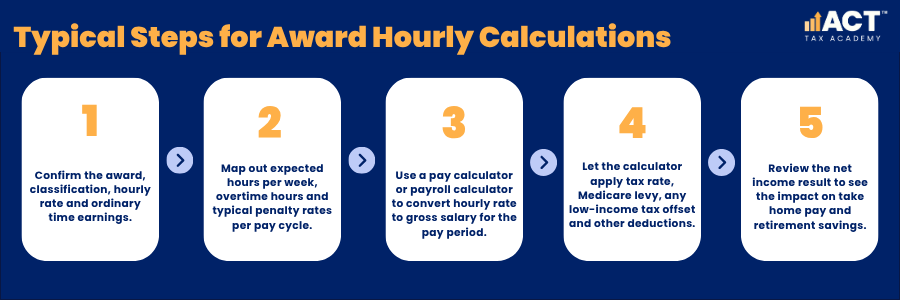
For award employees, you still start with the minimum hourly rate for their classification, then layer on penalty rates, overtime hours and allowances. Once you know how many hours per week, they usually work and how many overtime hours they are likely to pick up, you can estimate gross income for a typical pay cycle. That gross salary figure will then feed into income tax, superannuation guarantee and any salary sacrifice you set up.
To see what that means for take home pay, you can run the numbers through a net pay calculator or simple pay calculator. These tools usually ask for base salary or hourly rate, hours per week, pay period (weekly, fortnightly or monthly), and whether the tax-free threshold is claimed. From there they estimate tax withheld, Medicare levy, other deductions and net pay going into the bank account.
How Do You Calculate Hourly Pay for Non-Award Employees?
For non-award employees, the process is similar, but you start from the agreed base salary or hourly wage in the contract rather than an award table. You still need to set clear hours per week, any overtime hours expectations and how penalty rates or time off in lieu will work. The combination of base salary and typical hours then drives gross income, tax payable and superannuation guarantee amounts.
A salary calculator or salary converter can help you turn annual salary into an hourly rate and vice versa. This is handy when employees want to understand whether a pay rise or new offer is fair compared with market value, or when comparing permanent roles with contractor pay. For contractors, a contractor pay calculator can help compare rates but remember that some contractors paid mainly for their labour may still be entitled to super guarantee contributions. Contractor arrangements also differ from employees because paid leave and other entitlements may not apply in the same way.

How Should You Handle Casual Loading, Tax and Minimum Wages?
Casual loading remains a key part of pay for casual hourly workers, but once you have the combined casual rate you still run it through the same tax rules. Casual staff usually care most about what goes into their bank account each pay cycle, so using an hourly rate calculator or take-home pay calculator to show net pay can build trust. You will enter their combined casual hourly rate, hours per, and pay period, then see gross income, tax withheld and home pay.
For lower earners, the tax system includes low-income tax rules and the low-income tax offset to reduce tax payable and support net pay, alongside specific superannuation access rules and exceptions. When taxable income sits under certain thresholds, the calculator applies these offsets automatically, as well as the Medicare levy, and potentially the Medicare levy surcharge where income exceeds the relevant threshold and the person does not have the appropriate level of private patient hospital cover. This is one reason why two employees on the same gross income may have slightly different net income, depending on student loan repayments, salary sacrifice and private hospital cover status.
What Are the Most Common Mistakes in Calculating Hourly Pay Rates?
Common mistakes still include using outdated hourly rate figures, misreading award penalty rules and failing to count all overtime hours. When tax is added to the mix, another mistake is to assume that the same tax rates apply in a flat way to all income without considering tax bracket steps and tax offsets. This can lead to confusion about why tax withheld and net pay change after a pay rise or an increase in overtime.
Another trap is ignoring the impact of salary sacrifice and salary packaging on taxable income and net pay. When employees salary sacrifice to superannuation or certain approved pre-tax benefits, they may reduce taxable income, although the outcome depends on the type of arrangement and any FBT implications.
How Can You Use Tools, Systems and Advice to Get Pay and Tax Calculations Right?
Modern payroll software often acts as an all-in-one payroll calculator, net pay calculator and PAYG withholding tool. You usually enter the base salary or hourly rate, ordinary time earnings and overtime hours, and the system then estimates withholding, super and net pay for each pay cycle. This helps employers with more accurate withholding during the year, although the employee’s final tax position is still worked out when they lodge their tax return.
From 1 July 2026, employers will need to pay super guarantee on payday rather than quarterly, so payroll systems and cash flow planning should be reviewed ahead of that change.
If your system does not have strong built‑in tools, you can use online salary calculator resources and simple PAYG withholding calculation or hourly rate calculator tools as a cross‑check. Many of these tools also let you test “what if” scenarios, such as different hours per week, pay period options and salary sacrifice levels. That makes it easier to talk through salary expectations, possible pay rise options, superannuation due dates and cash flow impacts with your team.

Conclusion
Getting hourly pay rates right for award and non-award employees is the first step; turning those rates into clear, reliable take home pay is the next. When you combine accurate hourly rate decisions with simple pay calculator tools, you can show staff exactly how gross income becomes net pay, including tax withheld, superannuation guarantee and any salary sacrifice. That clarity removes a lot of anxiety around home pay, tax payable and long‑term retirement savings.
If you would like help checking your current hourly rate structures, pay cycle settings or how your payroll calculator handles tax and super, our team can walk through it with you. We can also help you align employment contracts, pay calculations and estimating pay tools so that both you and your staff have confidence in every payslip. Would you like us to tailor this approach more to salaried staff, hourly workers, or contractors in your client base?