Growing from Micro to Small Business: When to Switch from Xero to QuickBooks (or Vice Versa)
Growing from Micro to Small Business: When to Switch from Xero to QuickBooks (or Vice Versa) is a decision about choosing the right accounting software for your next stage of growth. A micro business may only need to send invoices and track expenses, but a growing small business often needs stronger payroll processing, bank reconciliation, inventory management, and cash flow reporting.
Start With the Work Your Business Now Needs to Manage
The best time to review your accounting software is when your accounting processes become harder to manage inside your current system. A sole trader may start with basic accounting tools, but a growing business may need to manage payroll, reconcile transactions across several bank accounts, track cash flow, and prepare more detailed financial reports.
For example, a consultant may only need cloud accounting software to create invoices, claim expenses, and review income each month. A growing trade, retail, or service business may need bank feeds, bill management, recurring invoices, inventory tracking, project tracking, and better tracking tools to understand profit and cash flow.
Xero vs QuickBooks: What the Comparison Really Means
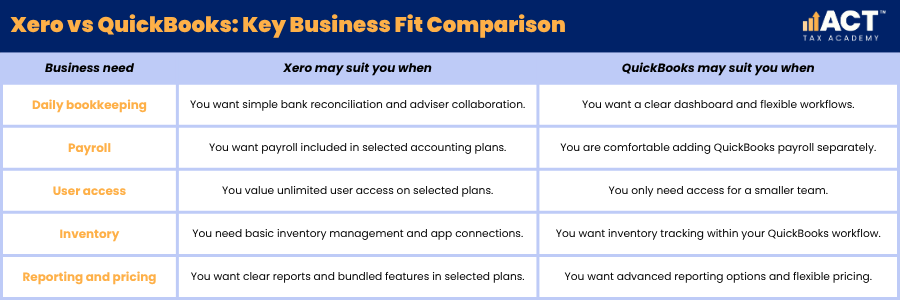
Xero vs QuickBooks is not about finding one platform that suits every business. It is about matching the key features of each accounting solution to your business size, team structure, bookkeeping habits, and adviser support.
Both Xero and QuickBooks can help small businesses send invoices, track expenses, connect bank accounts, and review financial reports. The key differences usually appear in areas such as payroll setup, user access, inventory management, project management, pricing, reporting, and how comfortable your team feels using the software.
When Xero Accounting Software May Be the Better Fit
Xero accounting software may be a strong fit if your business wants a user friendly accounting software option with cloud accounting, bank feeds, GST support, and adviser collaboration. Xero offers accounting features such as invoicing, bill management, bank reconciliation, expense tracking, payroll options, and reporting tools that can support growing businesses.
Many businesses prefer Xero when they want unlimited users on selected plans, simple collaboration with a bookkeeper or accountant, and an intuitive interface for daily bookkeeping. Xero can also suit businesses that need third party apps, scan receipts, upload receipts, track cash flow, and manage payroll in a system that many Australian advisers already know well.
When QuickBooks Online May Be the Better Fit
QuickBooks Online may be a better fit if your business wants flexible plans, practical automation features, and a clear way to manage invoices, expenses, bank transactions, and reporting. QuickBooks offers tools to create invoices, send invoices, track expenses, manage finances, and review cash flow from a cloud accounting platform.
QuickBooks features may suit businesses that like its dashboard, reporting layout, and workflow automation. However, QuickBooks payroll, payroll core, and payroll premium options may involve additional fees, so payroll processing should be reviewed carefully before switching.

QuickBooks vs Xero for Payroll, GST and ATO Reporting
QuickBooks vs Xero becomes especially important once your business employs staff or reports GST regularly. Payroll, Pay As You Go withholding (PAYG withholding), superannuation, leave, and Business Activity Statement (BAS) reporting all depend on accurate setup and clean transaction records.
If you need to manage payroll, check whether the payroll features match your employee numbers, pay cycles, awards, and reporting needs. For GST and ATO reporting, both QuickBooks and Xero need correct GST coding, reliable bank reconciliation, complete tax invoices, and regular review so your BAS figures are based on accurate bookkeeping.
Compare the Key Features Before You Switch
The right accounting software should make routine work easier, not just offer more advanced features. Before moving from Xero to QuickBooks, or from QuickBooks to Xero, compare the tasks you complete every week and the reports you need every month.
This comparison should include payroll processing, bank feeds, invoice templates, expense management, inventory tracking, project management, multi currency support, integration capabilities, and financial reports. If your team uses project management software, payment systems, or industry-specific tools, check whether each platform connects smoothly before you move.
Signs You Have Outgrown Your Current Accounting Software
You may have outgrown your current accounting software if your bookkeeping now depends on spreadsheets, repeated corrections, or extra manual data entry. Other signs include slow bank reconciliation, unclear GST coding, limited reporting, poor cash flow visibility, and difficulty giving your accountant accurate information.
For example, a growing retail business may need basic inventory management at first, then later need stronger inventory tracking, supplier reporting, and payment system integration. A service business may begin with simple invoicing, then need project tracking, recurring invoices, expense approvals, and better reports on job profitability.
Switching from Xero to QuickBooks
Switching from Xero to QuickBooks may make sense if QuickBooks Online gives your business a more suitable interface, pricing structure, reporting style, or workflow. This can be useful for small businesses that want QuickBooks features such as custom reports, automation features, expense management, and practical tools for tracking income and expenses.
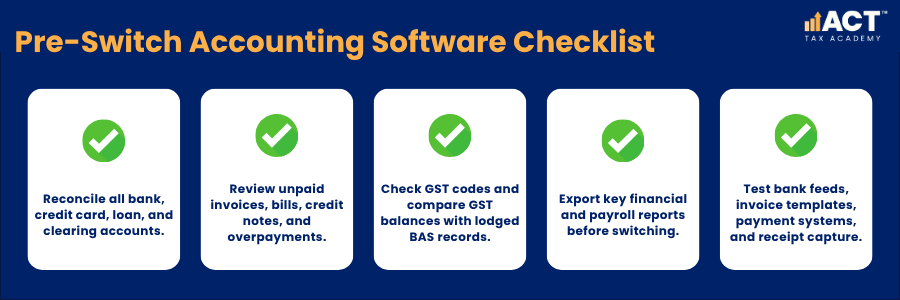
Before switching, review unpaid invoices, unpaid bills, bank accounts, GST balances, payroll records, and opening balances. Choose a clean changeover date, such as the start of a month, quarter, or financial year, so your bank transactions and reports do not become split across two systems.
Switching from QuickBooks to Xero
Switching from QuickBooks to Xero may be worthwhile if your adviser prefers Xero, your team finds Xero more user friendly, or you want Xero’s accounting tools for Australian bookkeeping workflows. Some businesses prefer Xero because both Xero and its connected apps can support payroll, bills, invoices, receipts, bank feeds, and financial reports in a familiar structure.
Before moving, check your chart of accounts, customer records, supplier records, GST codes, payroll categories, and bank reconciliation status. Clean data is more important than speed because errors carried into the new file can affect BAS reporting, cash flow reviews, and company finances.
Plan the Change Around BAS, Payroll and Reporting Dates
The safest time to switch accounting software is usually the start of a new month, quarter, or financial year. This gives you a clear reporting break and makes it easier to compare balances between the old and new systems.
For a GST-registered business, align the changeover with your BAS cycle where possible and use a structured BAS lodgement checklist so your figures reconcile cleanly between systems. For employers, review payroll processing, employee records, leave balances, superannuation, PAYG withholding, and Single Touch Payroll (STP) settings before the first pay run in the new system.
Migration Checklist for Small Businesses
A structured migration helps protect your financial records and reduce stress. Treat the move as a bookkeeping project, not a simple software change.
Common Mistakes to Avoid When Choosing an Accounting Solution
The most common mistake is choosing accounting software based only on price. QuickBooks pricing or Xero plan costs matter, but a cheaper subscription may cost more if it creates extra work, weak reporting, payroll errors, or more time spent fixing bookkeeping issues.
Another mistake is choosing advanced features without checking whether your team will use them properly. A user-friendly system with essential features, clean bank feeds, reliable expense tracking, and clear financial reports, supported by basic bookkeeping practices for small business, is often more valuable than a complex setup that no one maintains.
Frequently Asked Questions

Build Practical Bookkeeping Skills
Growing from micro to small business is the right time to review whether your accounting software still supports your daily work, GST records, payroll processing, BAS preparation, bank reconciliation, and cash flow reporting. Xero and QuickBooks can both be practical options, but the better choice depends on your business model, adviser support, accounting processes, and the way you manage company finances.
If you are ready to move from theory to practical application, the ACT Tax Academy Bookkeeping Course for Small Businesses provides structured online training designed specifically for Australian small business owners and aspiring bookkeepers. You will learn how to set up and manage GST, prepare BAS, use Xero effectively, and implement compliant bookkeeping systems with confidence.