QuickBooks Online vs Xero Job Costing: Which Works Better for Tradies and Project‑Based Businesses?
QuickBooks Online vs Xero Job Costing: Which Works Better for Tradies and Project-Based Businesses? For many Australian tradies and project-based small businesses, Xero is often the easier accounting software for simple project tracking, while QuickBooks Online may suit businesses that want stronger project profitability reports and already prefer QuickBooks features.
Job Costing Shows Whether Each Job Is Making Money
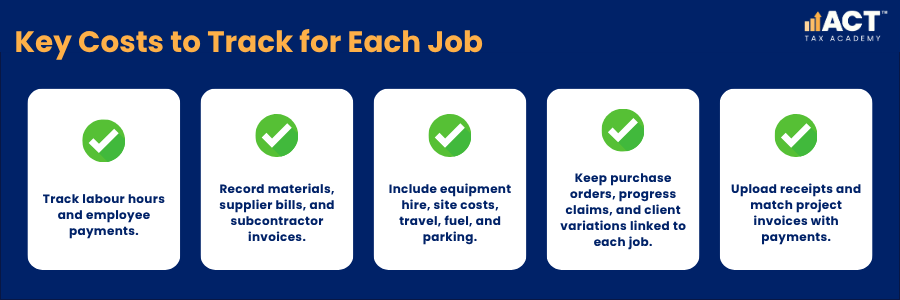
Job costing means recording income and costs against a specific job, project, client, or worksite. For a builder, electrician, plumber, landscaper, or consultant, this may include labour, materials, subcontractors, equipment hire, travel, and client variations. This is different from general bookkeeping because it shows job-level profit, not just overall business profit. Your balance sheets, profit and loss reports, and cash flow statement may show the business’s financial health overall, but job costing shows whether each project is helping or hurting that result.
How QuickBooks Online Supports Job Costing
QuickBooks Online offers project tracking tools that help you group income, costs, and transactions by job. When set up correctly, QuickBooks Online can help you track invoices, track expenses, view project profitability, and monitor whether actual costs are staying close to the original quote.
QuickBooks Online offers useful accounting tools for business owners who want detailed financial reports and a clear view of project results. Its key features may suit businesses that want advanced reporting, receipt capture, expense management, and access to the QuickBooks mobile app while working away from the office.
How Xero Supports Job Costing
Xero offers project tracking through Xero Projects, which helps businesses record time, costs, invoices, and profitability by job. For many tradies, Xero’s mobile app, bank feeds, and simple dashboard make everyday accounting tasks easier to manage.
Xero can be a practical QuickBooks alternative for small businesses that want a clean accounting solution without a steep learning curve. Xero and QuickBooks Online both support useful accounting processes, but Xero is often preferred by teams that want a simple way to manage finances, reconcile bank transactions, and reduce manual data entry.
QuickBooks Online vs Xero: Key Differences for Tradies
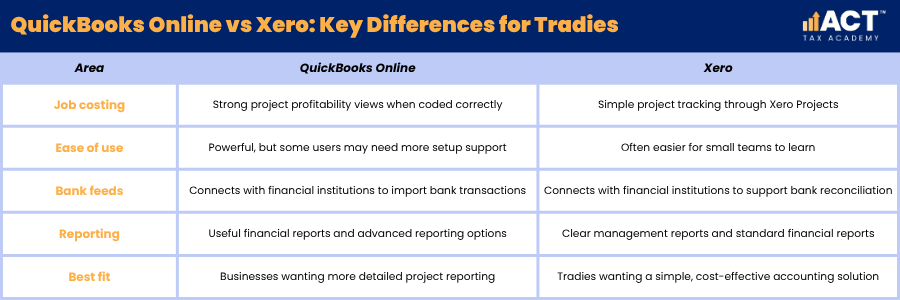
The key differences between QuickBooks Online vs Xero usually come down to workflow, reporting, ease of use, and the level of project detail your business needs. Both QuickBooks and Xero can help with bank reconciliation, expense tracking, bank account balances, and financial reports, but they present information in different ways.
QuickBooks Online may feel stronger for users who want more detailed project views and advanced tools, while Xero may feel more intuitive for businesses that value simplicity and adviser familiarity. When you compare Xero with QuickBooks, focus less on the brand name and more on whether the software supports your business processes.
Bank Feeds and Reconciliation Affect Job Costing Accuracy
Bank feeds help bring bank transactions from your bank account into your accounting software. This reduces manual data entry and makes it easier to reconcile transactions against invoices, bills, receipts, and job costs. Accurate bank reconciliation supports reliable job costing because payments and expenses need to match the right project. If bank balances, supplier payments, or client receipts are not reviewed regularly, financial reports may look complete while job-level information remains wrong, especially when you are already dealing with different accrual vs cash accounting methods.
Cash Flow Tracking Matters During the Job, Not After It
Good job costing helps you track cash flow while the work is happening. This is important because a profitable job can still create cash flow pressure if materials are paid upfront but the client pays later. QuickBooks Online and Xero both include tracking tools that help you review invoices, expenses, and bank account balances. For tradies, this can make it easier to see whether a project is funding itself or whether the business is carrying too much cost before the next payment comes in.
Inventory Management for Materials and Stock
Inventory management matters for tradies who carry parts, materials, or stock for repeat jobs. Basic inventory management can help you track quantities, monitor costs, and avoid underquoting when material prices change. Both Xero and QuickBooks can support inventory tracking, but neither should replace a specialised stock system for complex warehouses or large trade operations. For many small businesses, the goal is practical control over common items, not a complicated system that slows down everyday work.
Payroll and Labour Costs Need Careful Setup
Labour is often one of the largest costs in a trade or project-based business. If employee payments, payroll processing, Pay As You Go (PAYG) withholding, Single Touch Payroll (STP) reporting, super guarantee obligations, and job hours are not recorded accurately, project profitability reports can give a misleading result. QuickBooks Online payroll features in Australia depend on the plan, add-ons, and current product setup, while Xero also connects payroll information to accounting records where available. The important step is to make sure wages, STP reporting, PAYG withholding, super guarantee records, and time entries are handled consistently before relying on project reports.
QuickBooks Online vs Xero for Sending Invoices
Both QuickBooks Online and Xero allow you to send invoices and track whether clients have paid. If your business is registered for Goods and Services Tax (GST), your invoices should meet Australian Taxation Office (ATO) tax invoice requirements. This is essential for tradies who use deposits, progress claims, milestone billing, or final invoices at completion. A clear invoicing process supports cash flow, reduces the risk of missed payments, and helps GST-registered businesses keep invoice records that support Business Activity Statement (BAS) reporting using the most suitable simplified or full GST reporting method. When invoices are linked to the right project, you can compare billed income with job costs and quickly see whether the job is performing as expected.
Reporting and Dashboards Help You Make Better Decisions
Financial reports help business owners understand performance beyond the bank balance. Reports such as balance sheets, profit and loss reports, management reports, and a cash flow statement give a broader view of business performance, and they rely on organised records similar to those in a comprehensive business tax return documents checklist. QuickBooks Online may suit businesses that want advanced analytics and advanced reporting, while Xero’s intuitive dashboard can suit owners who want clear day-to-day visibility. Both systems can help track cash flow, monitor expenses, and review financial performance when information is entered correctly.

Third Party Apps Can Extend Both Platforms
Third party apps can add features that are not built deeply into the base accounting software. These may include job management, quoting, scheduling, timesheets, inventory management, receipt capture, payment collection, and automated workflows. Xero and QuickBooks both connect with app ecosystems, so the right setup may involve more than one tool. For example, a trade business may use a job management app for scheduling and site notes, then connect it to Xero or QuickBooks Online for invoices, expenses, bank feeds, and reporting.
Pricing Plans Should Match Your Business Needs
Pricing plans should be reviewed against your actual business needs, not just the monthly subscription price. A cheaper plan may become more expensive in practice if it lacks project tracking, payroll processing, advanced features, or enough users for your team. A cost effective accounting solution should save time, reduce errors, and support better decisions, particularly as ATO rules such as monthly BAS for non-compliant businesses can increase the administration load if your records are poor. Before choosing, check whether you need unlimited users, project tracking, payroll features, phone support, inventory tracking, advanced tools, or app connections for your business processes.
Which Works Better for Tradies?
Xero is often the better choice for tradies who want simple project tracking, easy bank reconciliation, clear invoicing, and mobile-friendly accounting tasks. It can work well for small teams that want to manage finances without spending too much time inside the software.
QuickBooks Online may work better for businesses that want stronger project profitability reporting, advanced features, and a more detailed view of job performance. Both QuickBooks and Xero can support tradies, but the best option is the one your team will use consistently.
Which Works Better for Project-Based Businesses?
For project-based businesses, the answer depends on how much reporting detail you need. QuickBooks Online can suit businesses that want deeper reporting around project profitability, while Xero can suit teams that want simple project tracking connected to everyday bookkeeping.
Consultants, builders, agencies, and service businesses should compare Xero and QuickBooks Online based on workflow, user access, reporting needs, and app connections. The right accounting software should support your quoting, invoicing, expense tracking, payroll, GST, BAS, record keeping, and cash flow process from start to finish, and be flexible enough to handle potential GST rate changes and base expansions without major disruption.
Practical Decision Guide for Australian Small Businesses
Choose Xero if you want simple accounting software, clean bank feeds, easy invoicing, and project tracking that fits everyday bookkeeping. This can be a strong option for small business owners who want to keep their accounting processes practical, easy to follow, and aligned with accurate GST, BAS, payroll, and record-keeping obligations.
Choose QuickBooks Online if you want more detailed project reporting, advanced reporting options, and accounting tools that can support a more structured job costing process. When reviewing Xero vs QuickBooks, focus on your business needs, your team’s confidence, and the reports you need to run the business efficiently.
Frequently Asked Questions

Build Practical Bookkeeping Skills
QuickBooks Online and Xero can both support job costing, but they suit different ways of working. Xero is often practical for tradies who want simple accounting software and clear project tracking, while QuickBooks Online may suit businesses that need more detailed project profitability views and advanced reporting.
If you are ready to move from theory to practical application, the ACT Tax Academy Bookkeeping Online Course provides structured online training designed specifically for Australian small business owners and aspiring bookkeepers. You will learn how to set up and manage GST, prepare BAS, use Xero effectively, and implement compliant bookkeeping systems with confidence.