Xero, MYOB, or Quickbooks: Comparing Australian Bookkeeping Software Features Specific to GST and BAS Lodgement
Xero, MYOB, Or QuickBooks: Comparing Australian Bookkeeping Software Features Specific to GST And BAS Lodgement is a key decision if you want the right accounting software to manage finances and stay compliant. Many small business owners compare Xero vs QuickBooks and MYOB because each offers different accounting features, user interface and local support for the Australian market. Choosing between Xero and QuickBooks Online vs MYOB is easier when you focus on GST, BAS lodgement and how each accounting tool supports your day‑to‑day accounting processes.
Strong GST and BAS tools help you track cash flow, bank transactions, and GST collected/paid (and other BAS obligations such as PAYG), rather than general ‘tax deductions’ which are typically handled in income tax workflows. When bank feeds are connected and reconciliations are kept up to date, your GST and BAS figures are typically more reliable and less stressful to lodge. Cloud-based service options like Xero and QuickBooks Online also offer intuitive interface designs, quick access to management reports and smarter business tools for small businesses that are always on the move.
What Makes GST and BAS Features So Important in Your Accounting Software?
If you are registered for GST, every sale, purchase and bank transaction affects your BAS, so your accounting software must track GST accurately. Many small business owners want an accounting solution that calculates GST from correctly coded transactions and auto-populates key BAS labels, reducing manual entry (some labels may still require manual completion, depending on your obligations and setup). The best accounting software also helps you track invoices, manage cash flow and generate balance sheets, so GST and BAS are just part of a broader, organised picture.
When you choose an accounting system with solid BAS tools, you reduce the risk of errors and missed deadlines. Automated workflows, bank reconciliation and clear management reports make it easier to review figures before lodgement. Having local support and chat support available also reassures small business owners who prefer guidance when something does not look right.
Xero: How Does It Support GST, BAS and Australian Small Businesses?
Xero offers automated GST tracking so every invoice, bill and bank feed entry is coded correctly as you go. Xero connects with many Australian financial institutions via bank feeds so you can import transactions (often daily, depending on the bank) and reconcile regularly for up-to-date reporting. For BAS time, Xero’s Activity Statement and reports help you review GST totals and prepare your statement, and if your organisation is connected to the ATO you can lodge the Activity Statement electronically from Xero (with appropriate permissions).
Both Xero and MYOB suit businesses that want cloud-based service and strong Australian market support. Xero supports expense claims via its mobile app, but expense claiming is included for a limited number of people depending on plan, with the option to pay for additional submitters. Many small business owners like Xero’s intuitive layout, and Xero’s Australian business plans include unlimited users (while some add-ons and usage-based features can add extra charges).
MYOB: What Does It Offer for GST, BAS and Everyday Bookkeeping?
MYOB provides accounting software with built‑in GST codes that apply to sales, purchases and payroll, helping you prepare accurate BAS. It connects to bank feeds so you can match bank transactions to invoices and bills, which supports regular bank reconciliation. For businesses that want more traditional accounting tools, MYOB’s user-friendly interface and detailed reporting make it easier to manage finances, track invoices and view management reports.
MYOB also supports payroll, inventory tracking and project tracking, depending on your plan. This can suit businesses like trades, retail stores and professional services that need bookkeeping and payroll in a single accounting system. With MYOB, support is primarily delivered remotely (online resources, training, and support channels such as chat/callback/phone depending on plan), which suits users who want guided help without in-person visits.

QuickBooks Online: How Does It Compare for GST and BAS?
QuickBooks Online includes GST setup, BAS preparation, and optional electronic BAS lodgement once you connect QuickBooks to the ATO (via its supported connection process). QuickBooks Online vs Xero often comes up because QuickBooks offers a simple, user-friendly interface and clear GST Centre for BAS. When you connect bank accounts, you can reconcile transactions, review GST totals and prepare BAS from one place, instead of moving between multiple systems.
QuickBooks mobile app tools let you scan receipts, track expenses and view cash flow on the go, which many small business owners appreciate. QuickBooks Online offers tiered plans: higher tiers add more reporting and automation, and inventory tracking is available on Plus and Advanced in Australia (rather than being ‘advanced inventory’ by default). Small businesses that want a QuickBooks alternative to older desktop systems often find that QuickBooks and Xero and QuickBooks Online vs MYOB all deliver cloud-based service with similar core features, but different layouts and workflows.
Xero vs QuickBooks: What Are the Key Differences that Matter for GST And BAS?
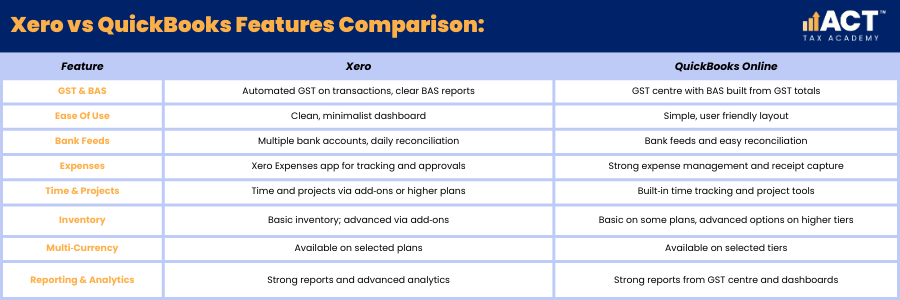
When people talk about Xero vs QuickBooks or QuickBooks vs Xero, they usually focus on GST tools, reporting and ease of use. Both Xero and QuickBooks let you track cash flow, connect bank accounts and use bank feeds to keep bank account balances up to date. The key differences sit in user interface, how BAS reports look, how Xero’s dashboard compares to QuickBooks’ GST Centre, and how each handles advanced reporting or project tracking.
QuickBooks Online offers strong expense management and time tracking, along with tracking projects on higher plans. Xero offers basic inventory management and can add advanced inventory features through add‑ons, while QuickBooks includes basic inventory management on some plans and advanced plan options for deeper stock control. If you want multi-currency, Xero includes it only on specific higher-tier plans, so confirm your plan tier before promising foreign-currency invoicing. On QuickBooks Online, it’s available on Essentials and Plus (not Simple Start), so confirm your subscription before enabling it.
How Does MYOB Fit in When You Compare Xero and QuickBooks?
When you compare QuickBooks online vs Xero vs MYOB, MYOB can be a good fit if you prefer an intuitive interface that feels more traditional and desktop‑style. MYOB’s accounting features cover GST, BAS, payroll and inventory tracking, which can suit businesses that have grown used to MYOB over many years. While Xero requires a shift to a more modern, minimalist screen layout, MYOB sometimes feels more familiar for business owners moving from older systems.
Both Xero and MYOB work as a QuickBooks alternative if you prefer their layout or pricing. MYOB’s detailed reporting and management reports help you see key features like profit, cash flow and GST amounts clearly before you lodge BAS. When you compare all three, we look at how each accounting tool supports your workflow, industry and comfort with cloud-based service.
How Do Pricing, Plans and Users Affect Your Choice?
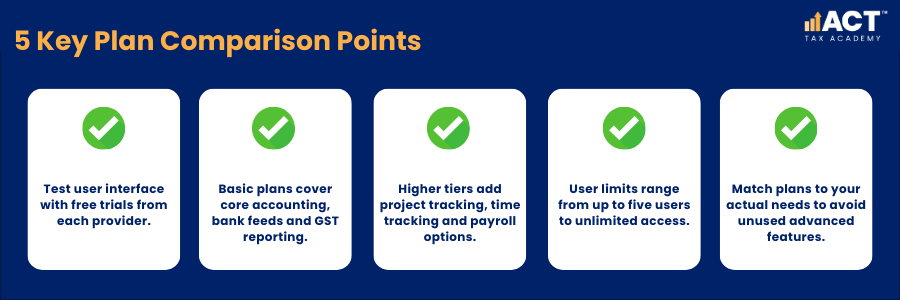
Most cloud accounting solutions now offer free trials so you can test which user interface feels more natural. Basic plan tiers in Xero, MYOB and QuickBooks suit businesses that only need core accounting features, bank feeds and basic GST reporting. As you move up tiers, you unlock features like project tracking, time tracking, payroll core or payroll premium and advanced reporting.
User limits influence growth: QuickBooks Online caps billable users by tier (for example 1 on Simple Start, 3 on Essentials, 5 on Plus, and 25 on Advanced), while Xero includes unlimited users. Xero offers plans where both Xero and your advisor can invite multiple users, while QuickBooks Online and MYOB have their own limits and options for multiple users. We help you compare not just price, but which features you will actually use so you are not paying for advanced analytics, or advanced inventory features you may never need.
How Do These Systems Handle Inventory, Projects and Extra Features?
Inventory management and project tracking are important for retail stores, trades and agencies. Xero offers basic inventory management and integrates with add‑on apps for more advanced inventory features. QuickBooks Online offers inventory tracking in higher tiers and adds features like tracking projects, time tracking and more advanced reporting for job profitability.
Both QuickBooks and Xero can handle multiple currencies on eligible plans, which helps if you invoice or buy from international customers and suppliers. MYOB also offers inventory tracking and detailed reporting for businesses that hold stock. When we assess your needs, we look at how deeply you need inventory management, whether you need multiple currencies and how these features link back to GST and BAS reporting.
How Do Mobile Apps, Dashboards and Ease of Use Compare?
Xero’s mobile app and Xero’s dashboard focus on giving you quick views of cash flow, outstanding invoices and bank account balances. The intuitive layout makes it easy to track invoices, scan receipts and approve Xero expenses while away from your desk. Many small business owners like that Xero integrates bank feeds, expense tracking and project tracking into one clean, user-friendly interface.
QuickBooks mobile app provides similar expense tracking and receipt capture, making it easy to record tax deductions on the go. QuickBooks Online offers a dashboard that shows cash flow, invoices and bank transactions in a simple format. MYOB’s mobile tools and online dashboard are also improving, giving you practical ways to manage finances, check bank reconciliation status and view management reports quickly.

How Can ACT Tax Academy Help You Choose the Right Accounting Software?
With so many accounting solutions on the market, it is easy to feel overwhelmed by feature lists and plans. We sit down with you to understand your business size, industry, number of bank accounts, need for payroll core or payroll premium, and how many users you need in your accounting system. From there, we compare Xero vs QuickBooks vs MYOB against your goals, so the software genuinely suits businesses like yours rather than ticking generic boxes.
We also help you set up bank feeds, GST codes, BAS templates and automated workflows so the system supports you at each BAS period. Whether you prefer Xero and QuickBooks, MYOB as a QuickBooks alternative, or are still comparing QuickBooks online vs Xero vs MYOB, we guide you through free trials and plan choices. Our goal is to give you clear, simple advice so your chosen accounting software makes BAS lodgement easier and gives you confidence in your numbers all year round.